考虑到网站服务器是在美国,如果直接将媒体文件存储在服务器上,在国内进行访问时对于图片的访问速度将会很慢,因此考虑将文件offload至国内容器,由于我在国内也有一台迷你主机与高速云服务器,因此最终选择本地部署MinIO + frp内网穿透的方式将文件offload到迷你主机上,再通过云服务器ip地址进行远程访问。MinIO通过portainer进行docker部署,再修改frpc.toml文件进行内网穿透,过程简单,这里直接跳过。
在MinIO部署完成后需要在Wordpress安装插件来与MinIO API交互,目前免费插件中显示支持S3 API规范的插件有Media Cloud Sync与Advanced Media Offloader,安装Advanced Media Offloader 4.2.3版本后发现存在无法连接bucket的bug,因此最终选择Media Cloud Sync。
通过Media Cloud Sync连接MinIO bucket后发现确实能够实现文件的自动上传,但440个文件,总是传输到第5个文件时直接卡死,且传输速度极慢,因此考虑将media file手动上传至MinIO,再通过Media Cloud Sync将数据写入数据库,但上传文件后发现Media Cloud Sync并不会对已经存在于bucket内的文件进行过滤,而是会重新上传,因此最终只能选择对插件源码进行修改。
首先为了便于调试,在include/base/db.php中新增drop_table方法,并在includes/admin的deactivation方法中进行调用,这样当插件deactivate时就会自动将插件数据库表进行删除,保证下一次activate时不会保留上一次的同步结果。
public function drop_table(): bool {
      global $wpdb;

      $table_name = self::get_table_name();
      $query = "DROP TABLE IF EXISTS {$table_name}";
      $result = $wpdb->query($query);
      if ($result === false) {
          error_log("WPMCS: Failed to drop table {$table_name}. Error: " . $wpdb->last_error);
          return false;
      }
      return true;
}
public function deactivation(){
Db::instance()->drop_table();
Logger::instance()->clear_logs();
Integration::instance()->clear_all_meta();
}同时需要对includes/base/services/s3compatible.php的uploadSingle方法进行修改,新增在上传前对文件是否已经存在的判断
public function uploadSingle($absolute_source_path, $relative_source_path, $prefix = '') {
    $result = array();
    if (
        isset($absolute_source_path) && !empty($absolute_source_path) &&
        isset($relative_source_path) && !empty($relative_source_path)
    ) {
        $file_name = wp_basename($relative_source_path);
        if ($file_name) {
            $upload_path = Utils::generate_object_key($relative_source_path, $prefix);
            if (!$this - > exists($new_path)) {
                $result = array(
                    'success' => true,
                    'code' => 200,
                    'file_url' => $this - > generate_file_url($upload_path),
                    'key' => $upload_path,
                    'message' => esc_html__('File Uploaded Successfully', 'media-cloud-sync')
                );
            } else {
                // Decide Multipart upload or normal put object
                if (filesize($absolute_source_path) <= Schema::getConstant('S3COMPATIBLE_MULTIPART_MIN_FILE_SIZE')) {
                    // Upload a publicly accessible file. The file size and type are determined by the SDK.
                    try {
                        $upload = $this - > S3CompatibleClient - > putObject([
                            'Bucket' => $this - > bucket_name,
                            'Key' => $upload_path,
                            'Body' => fopen($absolute_source_path, 'r'),
                        ]);

                        $result = array(
                            'success' => true,
                            'code' => 200,
                            'file_url' => $this - > generate_file_url($upload_path),
                            'key' => $upload_path,
                            'message' => esc_html__('File Uploaded Successfully', 'media-cloud-sync')
                        );
                    } catch (AwsException $e) {
                        $result = array(
                            'success' => false,
                            'code' => 200,
                            'message' => $e - > getMessage()
                        );
                    }
                } else {
                    $multiUploader = new MultipartUploader($this - > S3CompatibleClient, $absolute_source_path, [
                        'bucket' => $this - > bucket_name,
                        'key' => $upload_path
                    ]);

                    try {
                        do {
                            try {
                                $uploaded = $multiUploader - > upload();
                            } catch (MultipartUploadException $e) {
                                $multiUploader = new MultipartUploader($this - > S3CompatibleClient, $absolute_source_path, [
                                    'state' => $e - > getState(),
                                ]);
                            }
                        } while (!isset($uploaded));

                        if (isset($uploaded['ObjectURL']) && !empty($uploaded['ObjectURL'])) {
                            $result = array(
                                'success' => true,
                                'code' => 200,
                                'file_url' => $this - > generate_file_url($upload_path),
                                'key' => $upload_path,
                                'message' => esc_html__('File Uploaded Successfully', 'media-cloud-sync')
                            );
                        } else {
                            $result = array(
                                'success' => false,
                                'code' => 200,
                                'message' => esc_html__('Something happened while uploading to server', 'media-cloud-sync')
                            );
                        }
                    } catch (MultipartUploadException $e) {
                        $result = array(
                            'success' => false,
                            'code' => 200,
                            'message' => $e - > getMessage()
                        );
                    }
                }
            }
        } else {
            $result = array(
                'success' => false,
                'code' => 200,
                'message' => esc_html__('Check the file you are trying to upload. Please try again', 'media-cloud-sync')
            );
        }
    } else {
        $result = array(
            'success' => false,
            'code' => 200,
            'message' => esc_html__('Insufficient Data. Please try again', 'media-cloud-sync')
        );
    }
    return $result;
}在修改完成后重新加载插件,发现运行到20/440时会触发svg文件导致的 File extension is not supported 的报错并中断同步过程,但MinIO不需要对文件内别进行限制,因此直接在includes/integrations/media-library.php中对file extension的判断删除:
// Check whether the extension is enabled for uploading
if (!Utils::is_extension_available($file_path)) {
    Logger::instance() - > add_log('sync_to_cloud', $attachment_id, 'media_library', [
        'message' => __('File extension is not supported', 'media-cloud-sync'),
        'file' => $file_path,
        'code' => 415
    ]);
    return $attachment_meta;
}完成后再重新加载插件就发现文件能够正常同步,且不会将文件上传至MinIO了:
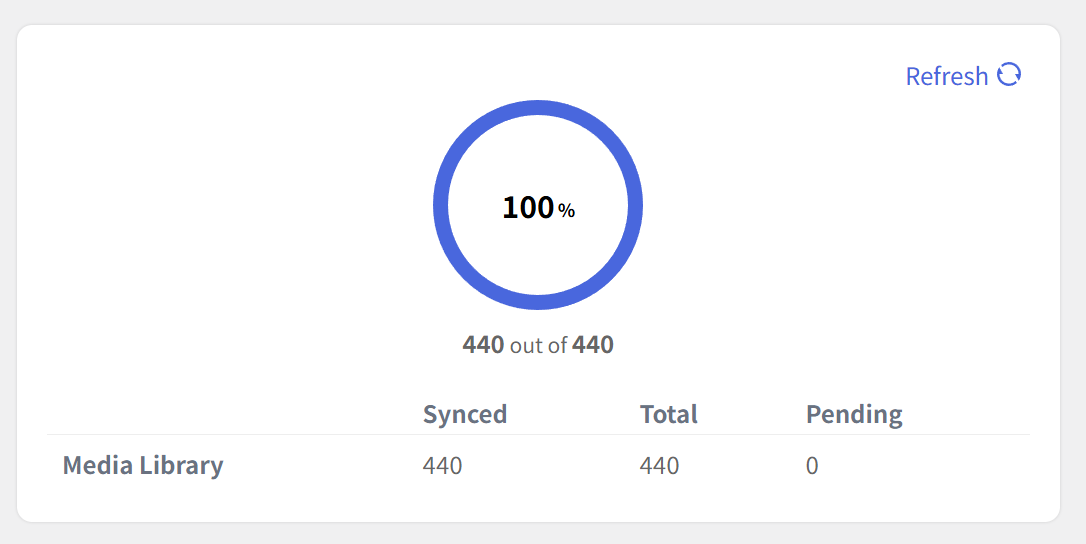
在进行测试时发现同步完成后上传新的文件时不会自动将文件上传至MinIO,因此在将文件批量同步后将插件重新恢复即可。